
The short version
- Backtesting = replaying past charts and logging every trade your rules allow.
- Track win rate, average win vs loss, profit factor and biggest drawdown, and log at least 100 trades of one setup.
- For a prop challenge, check every test day against the daily loss limit, trailing drawdown and consistency rule.
- Then put your backtest stats into our EV calculator to see which challenge you would most likely pass, and its real cost.
- Free TradingView replays daily charts only; minute-chart replay needs a paid plan.
- FX Replay, NinjaTrader Playback, TradingView Bar Replay and TradeZella all do replay; futures data on FX Replay needs Pro.
Prices and features are from each tool's own page, read Nov 22, 2026. A backtest shows how a plan did in the past; it does not promise future results.
What is backtesting in trading?
Backtesting means testing a trading plan on past price data to see how it would have done. You go back in time on a chart, take only the trades your rules allow, and write down every result.
It answers one question before you risk money: does this setup have an edge, or did it just look good on the few charts you remember? A backtest won't promise future results, but it shows you how a plan behaves on good days, bad days and boring days.
How to backtest a trading strategy, step by step
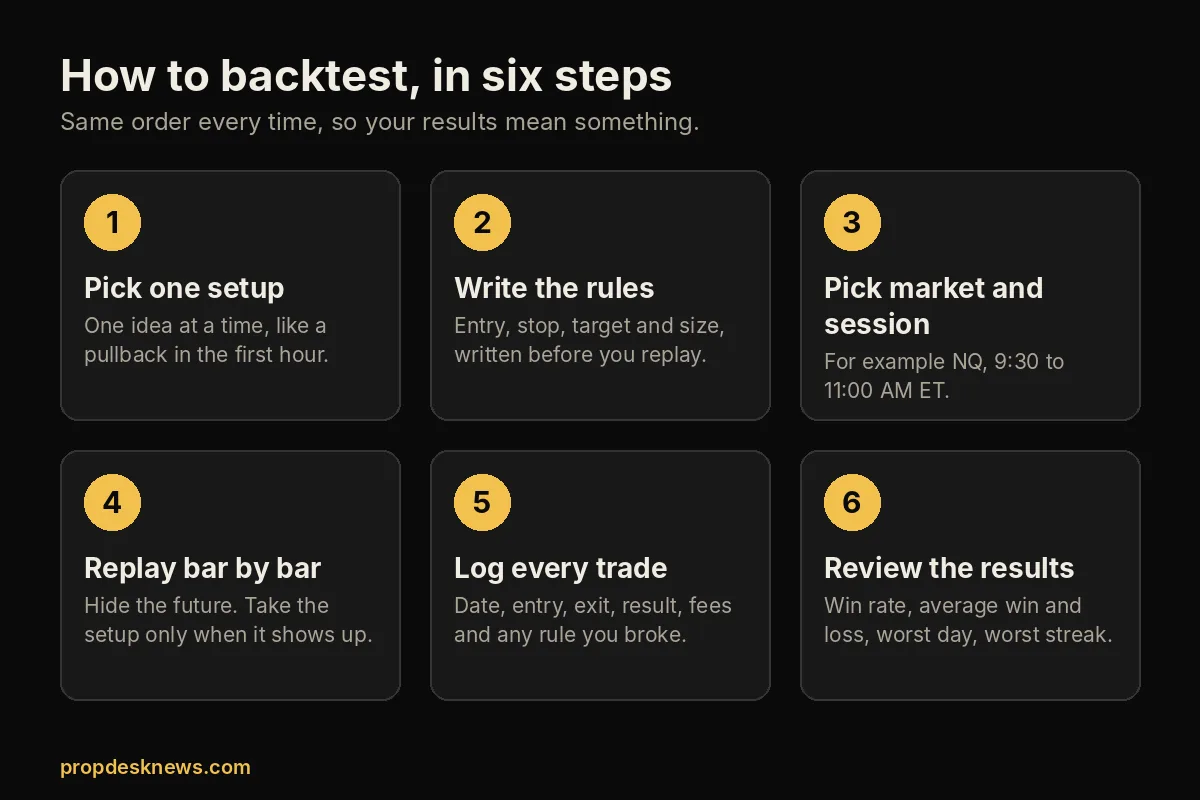
Pick one setup, write its rules, replay the chart bar by bar, and log every trade. Then review the numbers. Here are the six steps in order.
- Pick one setup. Test one idea at a time, such as a pullback in the first hour of the New York session. Mixing setups hides which one works.
- Write the rules down first. Entry, stop, target and position size, in words someone else could follow. If a rule needs your "feel", it can't be tested.
- Pick the market and session, in Eastern time. For example NQ from 9:30 to 11:00 AM ET. Futures behave differently overnight than at the open.
- Replay the chart bar by bar. Use a replay tool so the future stays hidden. Take a trade only when the setup shows up exactly as written.
- Log every trade. Date, time, entry, exit, result after fees, and any rule you broke. Losing trades count just as much as winners.
- Review the results. Win rate, average win, average loss, worst day and longest losing streak. Then decide: keep, change one rule, or drop it.
What results should you track in a backtest?
Track four numbers: win rate, average win compared with average loss, profit factor, and your biggest drawdown. Together they tell you if the setup makes money and how much pain it takes to get there.
- Win rate. The share of trades that made money. 40 winners out of 100 trades is a 40% win rate. On its own it tells you little, because a low win rate can still pay if the wins are big.
- Average win vs average loss. Add up your winning trades and divide by how many there were, then do the same for losers. If your average win is twice your average loss, you can be right less than half the time and still come out ahead.
- Profit factor. All your winning dollars divided by all your losing dollars. Above 1 means the setup made money in the test; below 1 means it lost.
- Biggest drawdown. The largest drop from your highest balance to the lowest point after it. This is the number to watch most as a prop trader.
Why drawdown matters most: a prop account ends when you hit the firm's loss limit, even if the setup would have recovered later. If your backtest's biggest drawdown is bigger than the firm's drawdown allowance, the plan would have failed that challenge, so trade smaller or pick a firm with more room.
Win rate, profit factor and your risk per trade are also exactly what our prop firm EV calculator asks for, so keep them handy for the next step.
How many trades (and how long) should you backtest?
Aim for at least 100 trades of the same setup before you trust the numbers. Thirty is a bare minimum to spot a problem. For time, cover at least a few months of past charts, so you see more than one kind of market.
The reason is luck. In 20 trades, a lucky streak can make a weak setup look great, or a bad week can make a good one look broken. The more trades you log, the less one streak can fool you.
Also test across different kinds of days: trending days, choppy days, and days with big news like CPI or FOMC. A plan that only works in one kind of market will hit the other kinds sooner or later.
How to backtest for a prop firm challenge
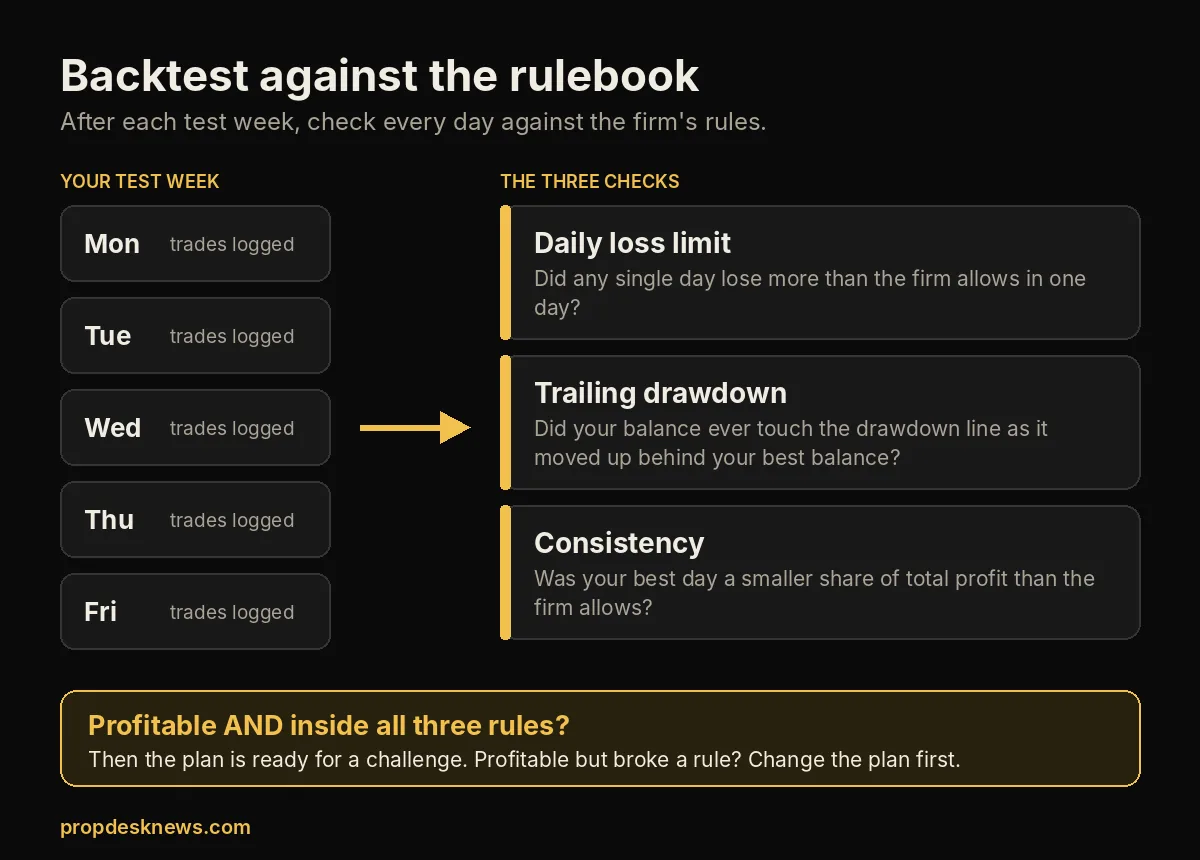
Backtest the way the firm will grade you: one day at a time, against its rules. A strategy can make money overall and still fail a challenge, because one bad day or one huge day breaks a rule.
After each test week, go through it day by day and check three things:
- Daily loss limit. Did any single day lose more than the firm allows in one day? If so, that day would have ended or paused the account.
- Trailing drawdown. Many futures firms move the loss line up as your balance makes new highs. Track your highest balance and check you never fell back to the line. Our drawdown runway calculator shows how much room you have left.
- Consistency. Some firms cap how much of your total profit can come from your best day. Put your test days into the consistency calculator to see if you would pass. Firms without this rule are on our no consistency rule list.
Then turn your backtest into pass odds. Put your backtest's win rate, profit factor and risk per trade into the prop firm EV calculator. It shows which futures prop firm plans you would most likely pass with those numbers, and what each one really costs once you count the tries it may take.
If you backtested in NinjaTrader or Tradovate, you can drop the trade export file in instead of typing the numbers. The file stays on your device.
Use your backtest numbers, not the ones you hope for. If the calculator says your odds are low on every plan, change the setup or your size before you pay for a challenge.
Can you backtest for free?
Yes. TradingView, NinjaTrader and FX Replay all have a free way in, but each has limits that matter to futures day traders. NinjaTrader's Playback is free for simulation, and FX Replay has a free plan (more on both below).
Can you use bar replay on TradingView for free?
Partly. TradingView's free Basic plan lets you use Bar Replay on daily and higher charts, but not on minute charts. Most futures day traders need minute charts, so free TradingView is too limited for them.
Replay on intraday charts starts with the paid plans, and how far back you can go depends on the plan. TradingView's help center says Essential replays 6 months of 1-minute data and Plus replays 1 year, with more on Premium.
Longer intervals go further back: 2-minute charts get twice as much history, and so on. Continuous futures symbols like NQ1! and ES1! have their own replay limits, so check TradingView's Bar Replay page for the symbol you trade.
If you want minute-by-minute futures replay without a TradingView upgrade, a dedicated replay tool like FX Replay or NinjaTrader's Playback is the next step (both below).
Backtesting software for futures traders
For manual futures backtesting in a browser, FX Replay is our pick. NinjaTrader is the free option if you already use it, and TradingView works if you have a paid plan. Here is how the four compare.
FX Replay
Replays past charts bar by bar in your browser for futures, forex, stocks and crypto, and has a prop firm simulator where you set a firm's profit target, daily loss and drawdown rules (on the Intermediate and Pro plans). There is a free plan.
Its pricing page lists Intermediate at $17.99 a month and Pro at $35 a month, and says futures (CME) data comes with Pro.
Is FX Replay free?
Yes, it has a free plan, and you can start without a credit card. Futures and stocks data come only with Pro, so a futures trader will need Pro to replay NQ or ES.
Good: made for replay, nothing to install, prop firm simulator on paid plans. Watch out: futures data needs the Pro plan.
Try FX Replay ↗Affiliate link · we earn a commission if you buy, at no extra cost to you. Today's deal is on our tools page.TradingView Bar Replay
Replay built into the charts many traders already use. Good: no new tool to learn. Watch out: minute-chart replay needs a paid plan, and the history is limited by plan (see above).
NinjaTrader Playback
NinjaTrader's Playback connection replays recorded market data so you can trade it in simulation, sped up when you want. NinjaTrader says it is free to use for simulation. Good: real futures tick data, free for sim.
Watch out: desktop software for Windows, and more setup than a browser tool.
TradeZella backtesting
TradeZella, a trading journal, has a backtesting area with manual, AI and automated modes, so test trades sit next to your real journal. Good: backtests and live trades in one place. Watch out: it is a paid journal with no free plan.
TradeZella ↗ Affiliate
Prices and features from each tool's own pricing or help page, read Nov 22, 2026. The tool's checkout is the final word.
Manual vs automated backtesting
Manual backtesting means you replay the chart and take each trade yourself. Automated backtesting means code takes the trades for you on years of data in seconds.
Manual is slower, but it trains your eye and works for setups that are hard to put into code, like most price action and ICT-style setups. Automated is fast and exact, but only for rules you can write as code, and it is easy to over-tune the settings until the past looks perfect.
Many traders start manual, then automate the rules that hold up.
Common backtesting mistakes
- Testing only good days. Skipping the messy days makes any setup look better than it is. Test every day in the range.
- Peeking ahead. If you can see where price went, you will "find" the setup only where it worked. Keep the future hidden.
- Skipping fees and slippage. Commissions and a tick or two of slippage add up fast on small targets. Take them off every trade.
- Changing the rules mid-test. If you change a rule, start the count again.
- Ignoring the firm's rules. A plan that breaks the daily loss limit once in 100 trades would still have failed that challenge.
Questions
Is backtesting free?
It can be. TradingView's free plan replays daily charts, NinjaTrader's Playback is free for simulation, and FX Replay has a free plan. Minute-chart futures replay usually needs a paid plan.
Can ChatGPT backtest a trading strategy?
It can help you write your rules clearly or write code for an automated test, but it cannot replay charts or take trades for you. You still need a replay tool or real data to test the plan.
Does backtesting guarantee results?
No. A backtest shows how a plan did on past data. Markets change, and live trading adds nerves, fees and slippage. Use it to drop bad ideas, not to predict profit.
Sources
Read on Nov 22, 2026:
Show all 10 sources
- FX Replay: Pricing ↗
- FX Replay: Prop Firm Simulator ↗
- Prop Desk: Prop firm EV calculator ↗
- TradingView: Bar Replay, how and why to test a strategy in the past ↗
- TradingView: How much data is available for Bar Replay? ↗
- TradingView: Pricing ↗
- NinjaTrader: Playback connection (help guide) ↗
- NinjaTrader: Trading simulator ↗
- TradeZella: Backtesting ↗
- TradeZella: Pricing ↗
Spot something out of date? Email hello@propdesknews.com and we'll fix it.
Related guides
Paper trading futures: sim vs paper vs prop evaluation
Free places to paper trade futures, and how sim, paper and a prop evaluation differ.
Updated Nov 12, 2026

How to open a Topstep Practice Account
The four clicks to add Topstep's free 150K Practice Account, who qualifies, the 15-lot limit, and how resets and closing work.
Updated Nov 7, 2026
Best trading journal for prop firm traders
TradeZella, TraderSync, Tradervue, Edgewonk and TradesViz compared on sync, prop tools and price.
Updated Nov 11, 2026